










Customer segmentation groups the people who buy from you according to what they have in common: how much they spend, how often they order, where they are, how recently they came back.
Shopify includes segmentation natively in every admin. Analyzify includes its own segmentation feature, built on the same Shopify data.
The two overlap in what they create and diverge in almost everything that happens afterward.
This is a straight comparison across the areas that decide which one fits your workflow: how segments are built, what reporting comes with them, how audiences reach your ad platforms, how often they refresh, what the platforms show you in return, and what data actually moves.
Key Takeaways
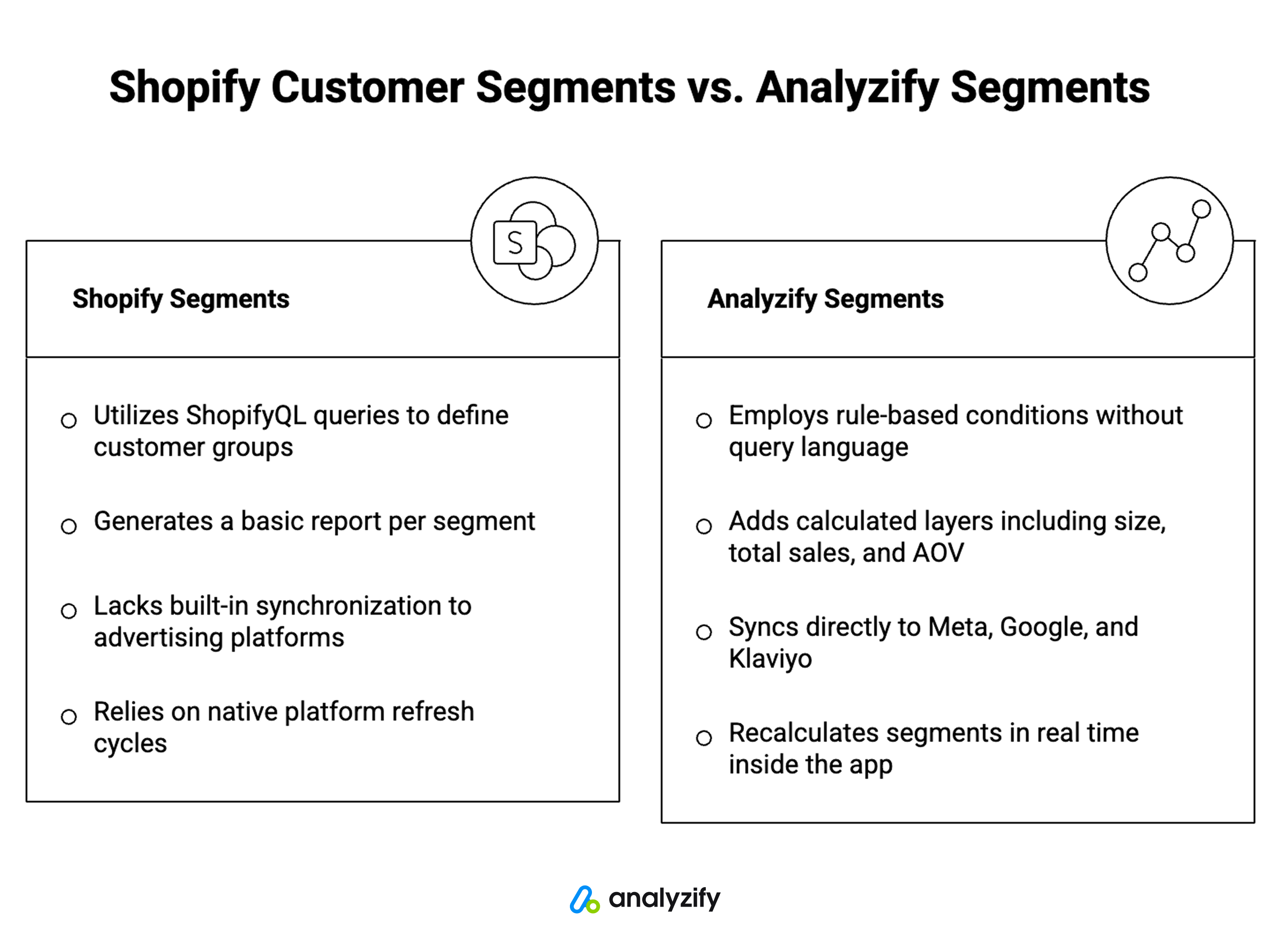
- Both build segments from Shopify data: Neither tool invents customer data; both read what your store already holds.
- Creation differs in method: Shopify represents segments as ShopifyQL queries; Analyzify uses pre-built segments or rule-based conditions with no query language involved.
- Reporting differs in depth: Shopify generates a basic report per segment. Analyzify adds a calculated layer: segment size, total orders, total sales, and average order value.
- Activation is the widest gap: Shopify has no built-in sync to advertising platforms. Analyzify syncs directly to Meta Ads, Google Ads, and Klaviyo, to one platform or several at once.
- No automation layer required: Reaching ad platforms from native segments means CSV exports or a Shopify Flow setup. Analyzify removes that step entirely.
- Ten segments arrive ready to use: Analyzify includes pre-built segments across behavior, loyalty, and retention, with conditions already written and open to editing.
- Update rhythms are different by design: Analyzify recalculates segments in real time inside the app; advertising platforms refresh matched audiences daily.
- Minimal PII moves: Analyzify sends email and name only. Phone numbers aren’t sent, because they aren’t needed for accurate matching.
How Segments Are Built
Shopify’s Customer Segments
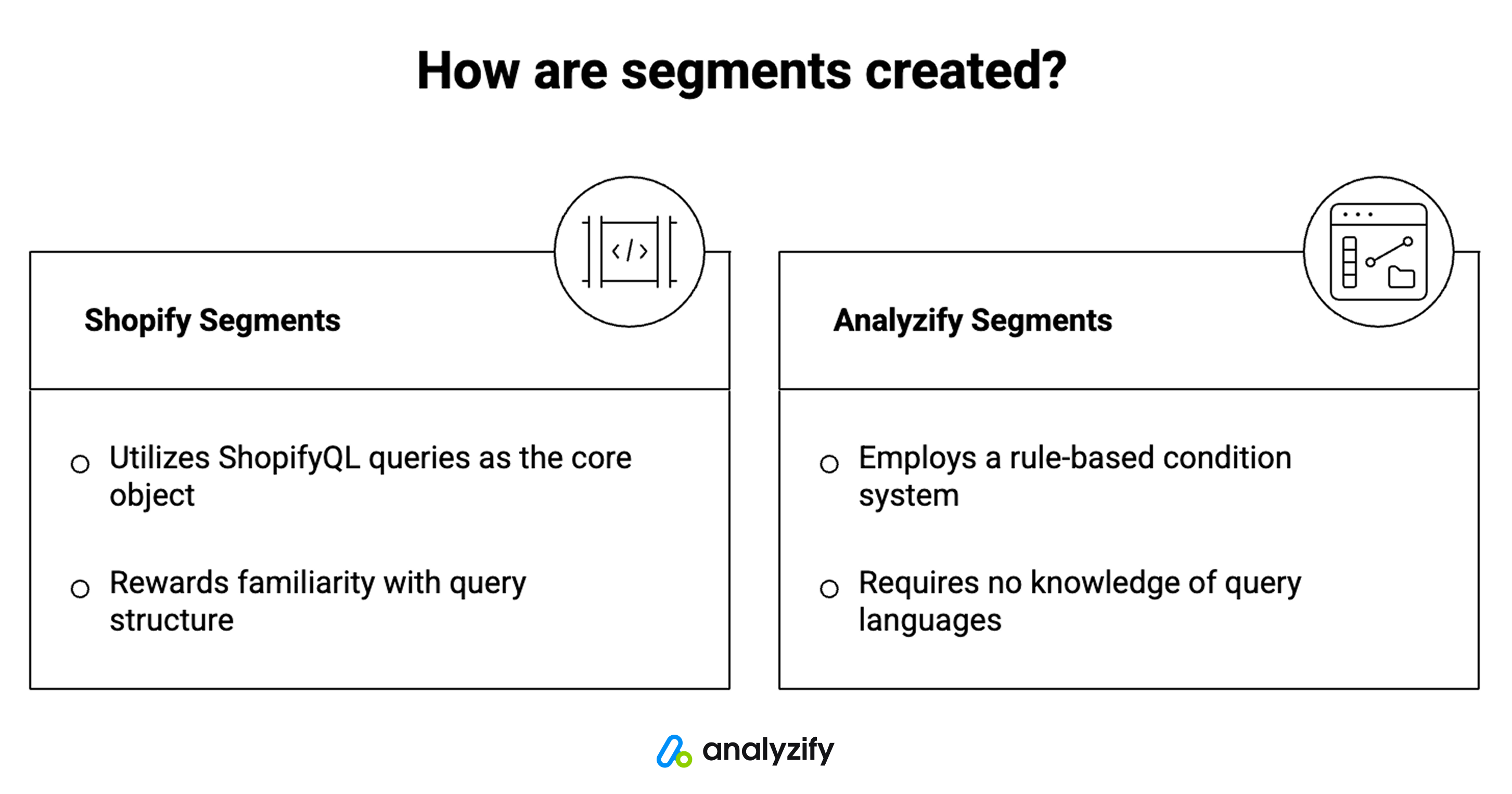
Shopify’s segment editor represents each segment as a ShopifyQL query. You can begin from a template, branch off an existing segment, edit the query directly, or describe what you want in plain language and let Sidekick generate it.
For common segments you may never touch the syntax, but the query is the underlying object, and customizing beyond the templates means working in the WHERE clause.
Shopify’s customer segments
Shopify’s segment editor represents each segment as a ShopifyQL query. You can begin from a template, branch off an existing segment, edit the query directly, or describe what you want in plain language and let Sidekick generate it.
For common segments you may never touch the syntax, but the query is the underlying object, and customizing beyond the templates means working in the WHERE clause.
Analyzify’s Pre-Built Segments
Before the question of how to build a segment comes the question of whether one needs building at all.
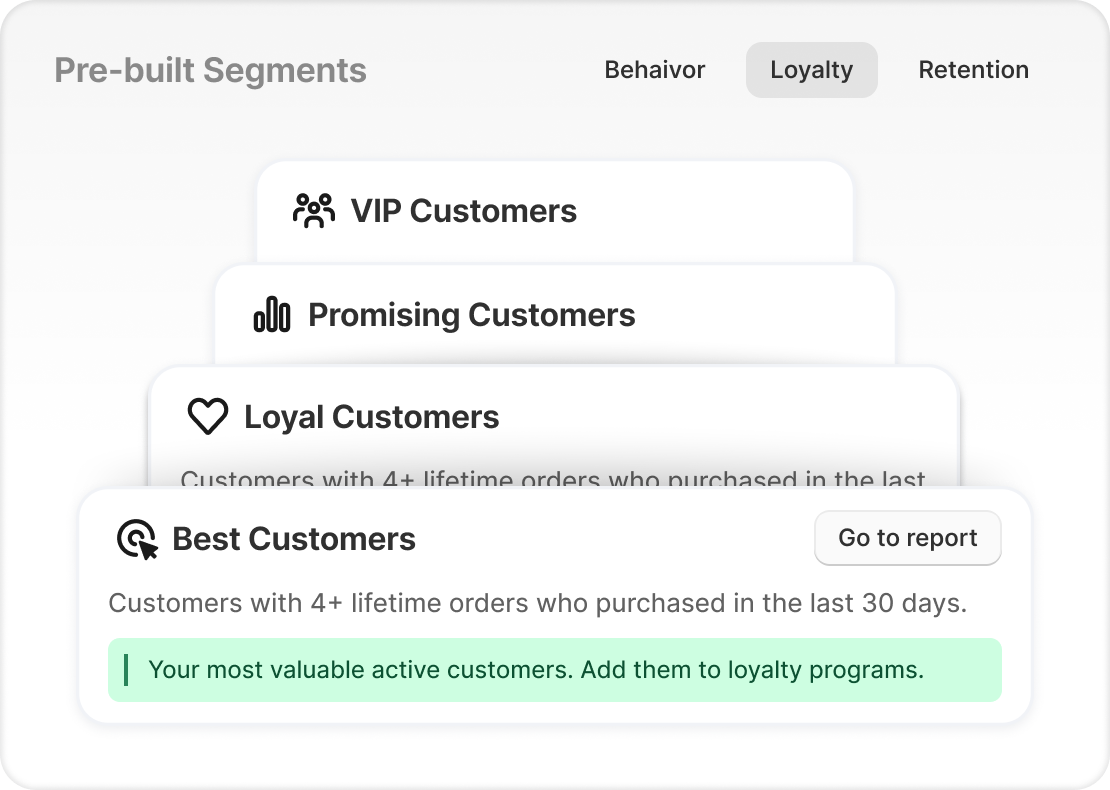
Analyzify ships with ten pre-built segments across three categories, with the conditions already defined:
Behavior
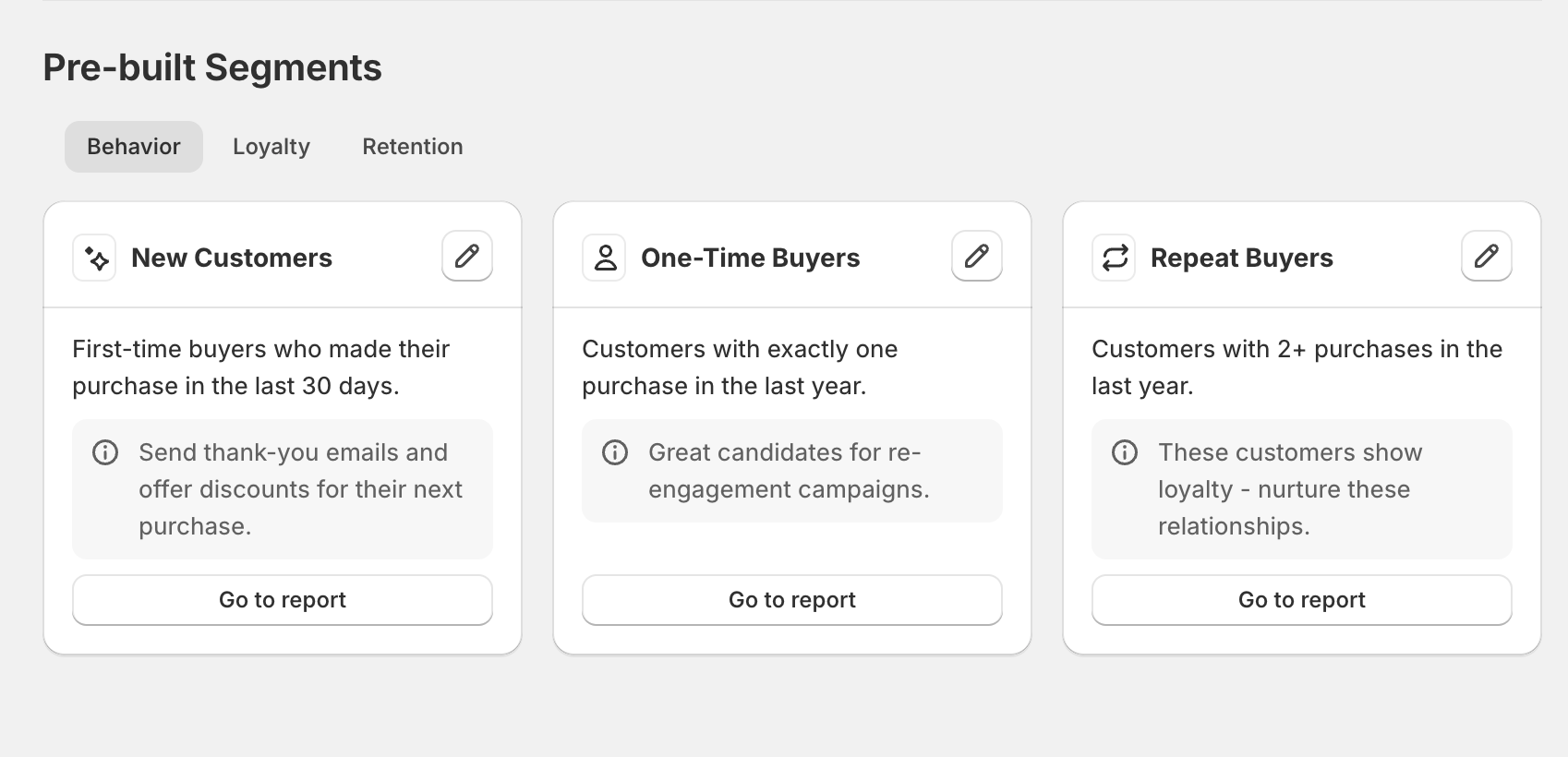
- New Customers: first-time buyers who purchased in the last 30 days
- One-Time Buyers: customers with exactly one purchase in the last year
- Repeat Buyers: customers with 2+ purchases in the last year
Loyalty
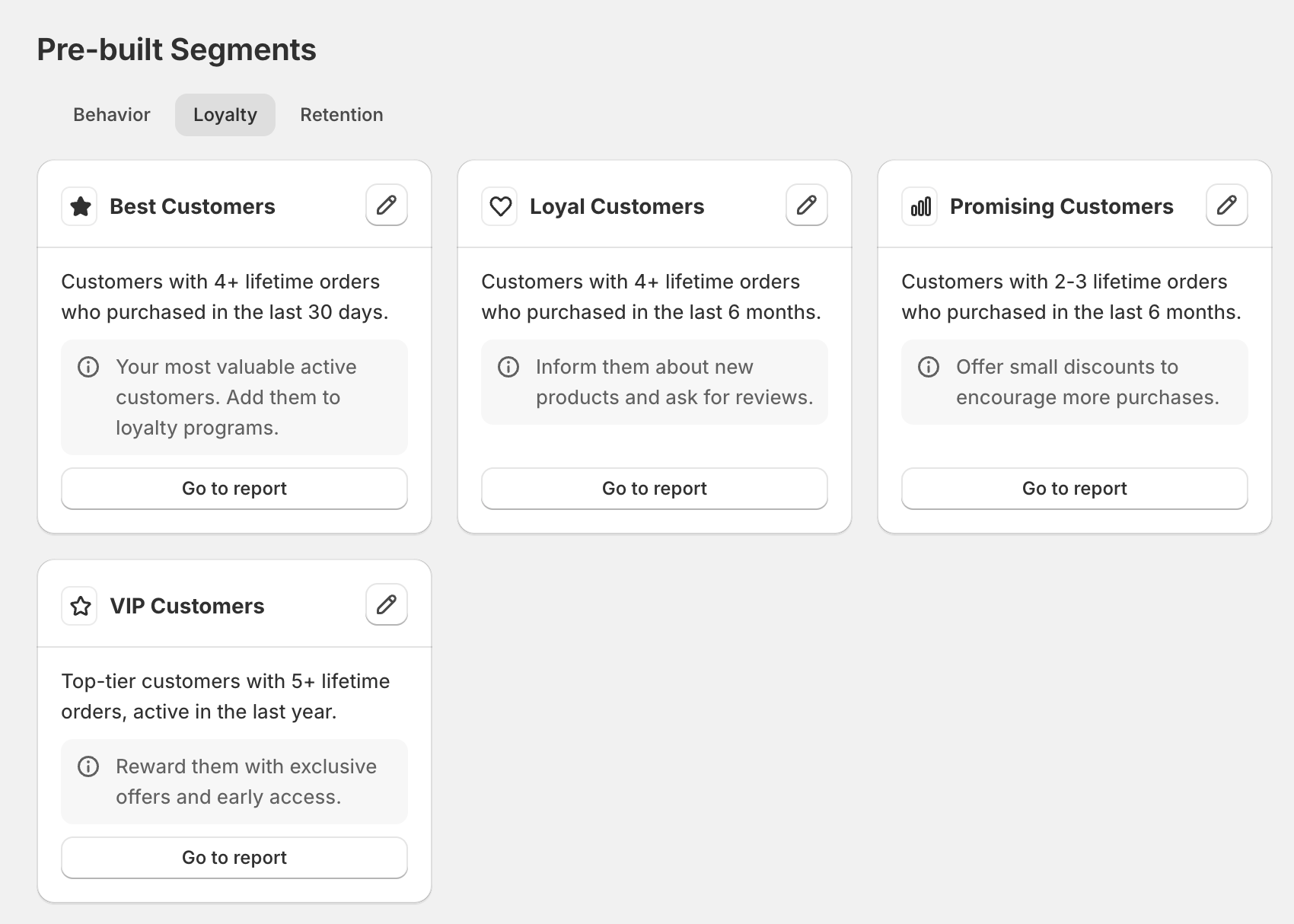
- Best Customers: 4+ lifetime orders, purchased in the last 30 days
- Loyal Customers: 4+ lifetime orders, purchased in the last 6 months
- Promising Customers: 2 to 3 lifetime orders, purchased in the last 6 months
- VIP Customers: top-tier customers with 5+ lifetime orders, active in the last year
Retention
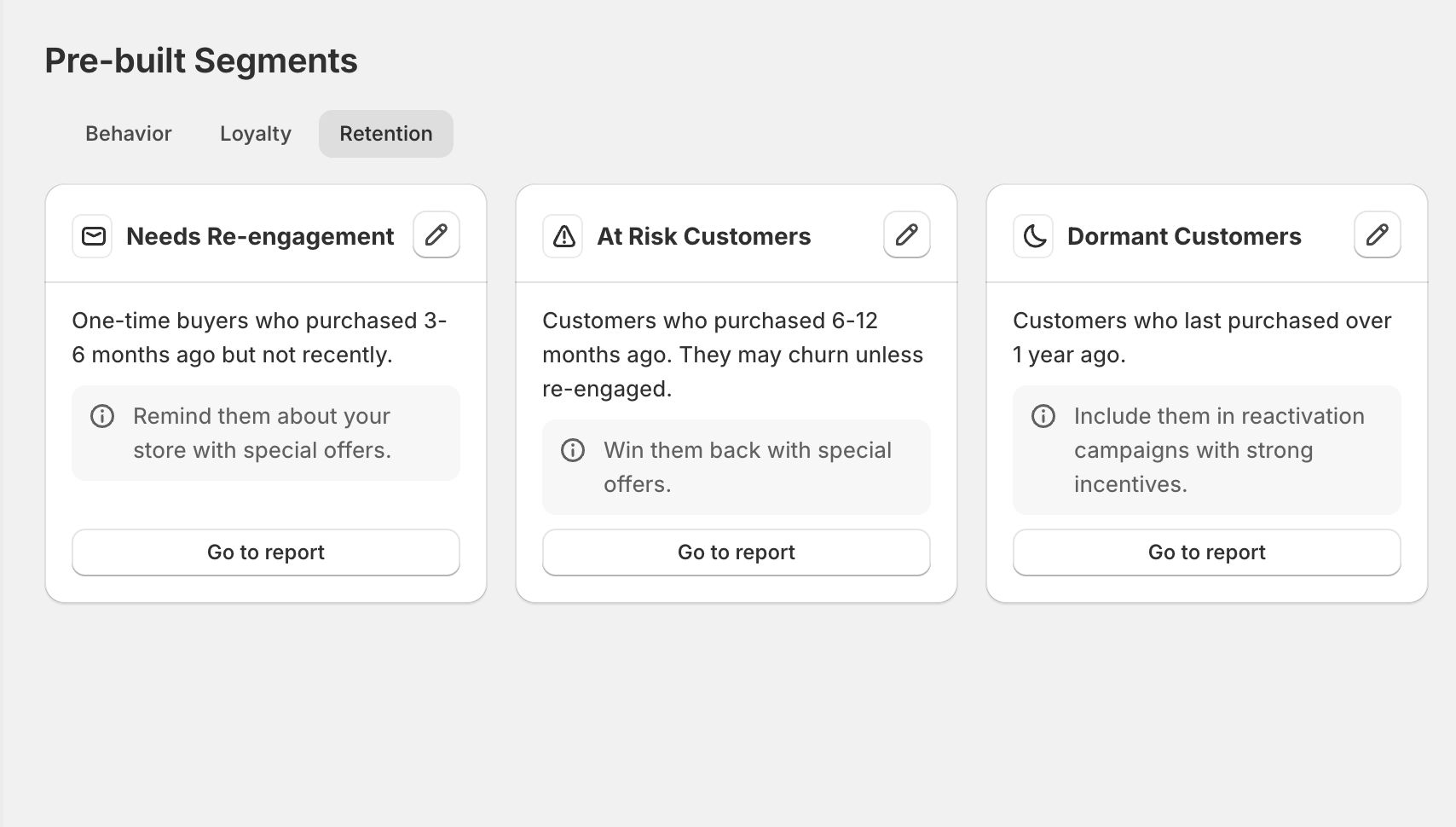
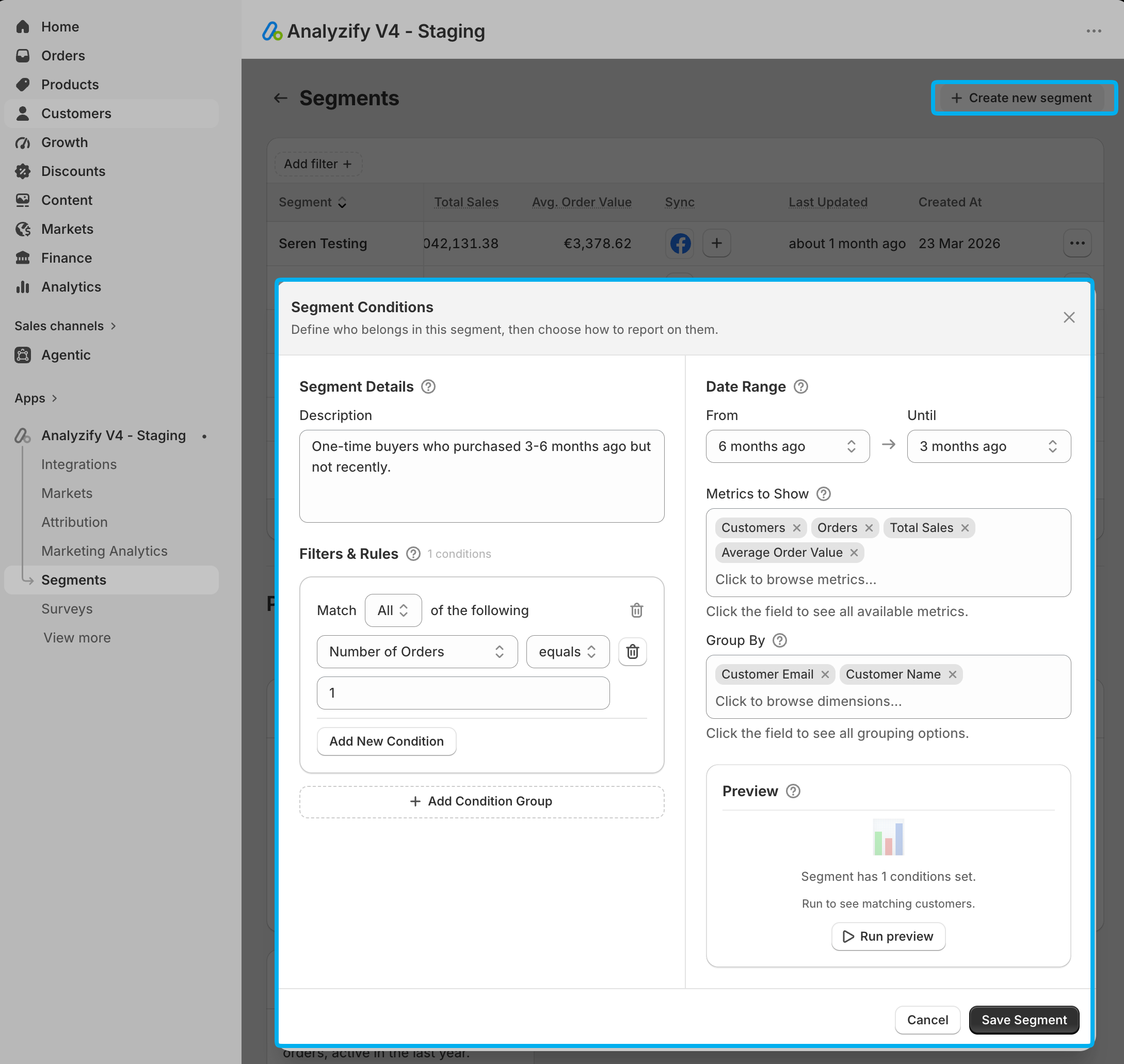
- Needs Re-engagement: one-time buyers who purchased 3 to 6 months ago but not recently
- At Risk Customers: customers who purchased 6 to 12 months ago and may churn without contact
- Dormant Customers: customers whose last purchase was over a year ago
Each card explains the audience, suggests what to do with it, and links to its report.
Each is also editable, so a threshold that doesn’t match your buying cycle can be adjusted rather than rebuilt from scratch.
Between them they cover the lifecycle most stores segment on anyway: who just arrived, who came back, who is worth protecting, and who is drifting.
Analyzify’s Rule-Based Approach
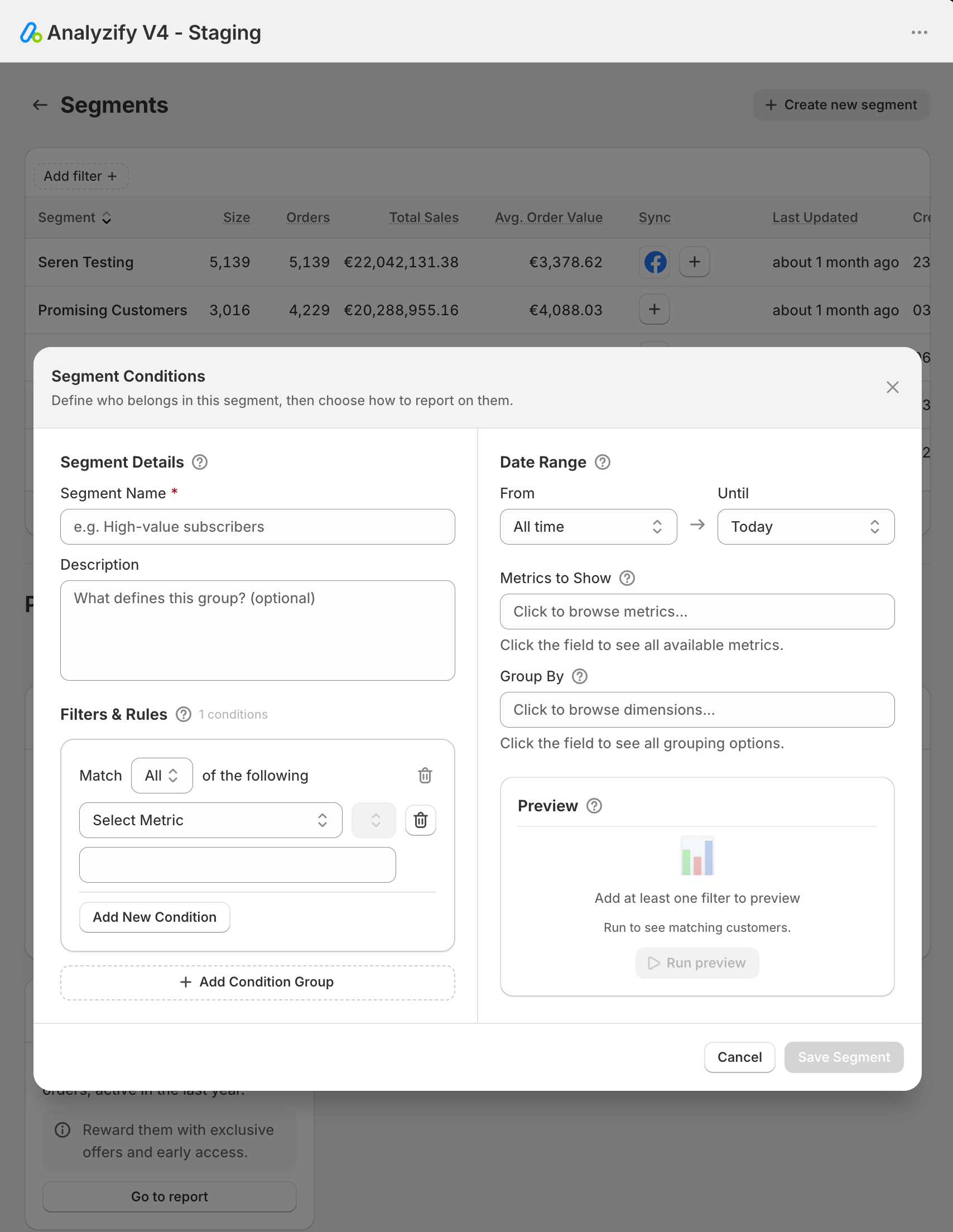 When you need something the Analyzify pre-built library doesn’t cover, you can define Analyzify Customer Segments through rule-based conditions, with no query language at any point. You choose a field, an operator, and a value.
The practical difference is who on your team can build one. A query-backed editor rewards familiarity with its structure. A rule builder doesn’t require any.
Filtering and Grouping
The Conditions Both Tools Support
Both tools support the conditions stores actually reach for: average order value above a threshold, customers with more than a set number of orders, customers in a specific country.
Analyzify builds segments from 25+ Shopify fields, including order count, RFM group, location, and purchase frequency.
Group-by Logic: One Rule Set, Many Audiences
Analyzify adds grouping on top of filtering. Using group-by logic, by country or by another attribute, a single rule set produces multiple segments at once. Each of those resulting groups can then be exported or synced individually.
That turns one piece of setup into a full set of ready audiences. Build a location-grouped segment once, and every country becomes its own syncable audience rather than a separate build.
Segment Reporting: What Each One Tells You
What Does Shopify’s Native Segment Report Show?
Once a Shopify segment is saved, Shopify generates a basic report beneath it.
Analyzify Segmentation Reports for Shopify Stores
Analyzify adds a reporting layer on top of the segment. Every segment carries calculated metrics:
- Total segment size
- Total orders generated by that segment
- Total sales
- Average order value
These are calculated by Analyzify rather than supplied by Shopify. Native segment reports don’t aggregate totals in the same form. They’re also usable as part of broader reporting and analysis inside the app, not just as labels on a segment.
The reason this matters is comparative. When four segments sit side by side with size, order volume, revenue, and AOV attached, deciding which one deserves budget stops being a judgment call and becomes a reading.
Getting Audiences Into Platforms
This is where the two tools separate most clearly.
Can Shopify Sync Segments to Advertising Platforms?
Shopify does not provide built-in syncing to advertising platforms. To use a native segment outside the admin, merchants generally rely on Shopify Flow or an additional automation tool.
Shopify does offer a Klaviyo integration, but direct syncing to Meta Ads or Google Ads isn’t available, and sending audiences to those platforms requires additional workflow setups that get complex quickly.
In practice that means one of two routines.
Export the segment as a CSV and upload it to each platform by hand. That is accurate at the moment of export, and drifting from that moment onward.
Or build and maintain an automation layer whose entire purpose is moving a list from one system to another.
Direct Sync to Meta, Google Ads, and Klaviyo with Analyzify
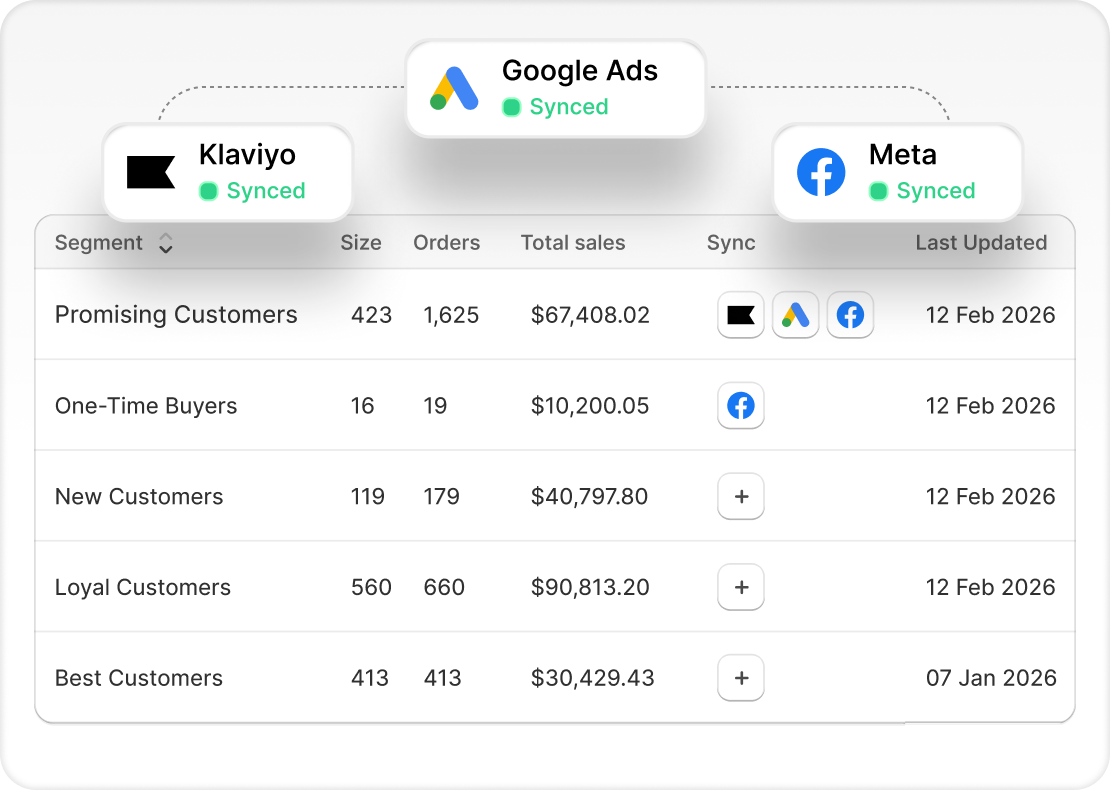
Analyzify syncs segments directly to marketing platforms. Audiences go to Meta Ads, Google Ads, and Klaviyo, and can be sent to multiple platforms simultaneously or to one individually. No Flow. No connector to maintain. No CSV cycle.
CSV export is still there when you want it, because sometimes you genuinely need the file, but it’s an option rather than the mechanism.
Creating Customer Segments with Analyzify
If a pre-built segment already fits, there is nothing to create. For everything else, the sequence is short:
1. Create the segment using filter conditions. For example, one-time buyers who purchased 3-6 months ago but not recently:
2. Preview & Save: your customer segment.
3.Export or sync it to your platforms:
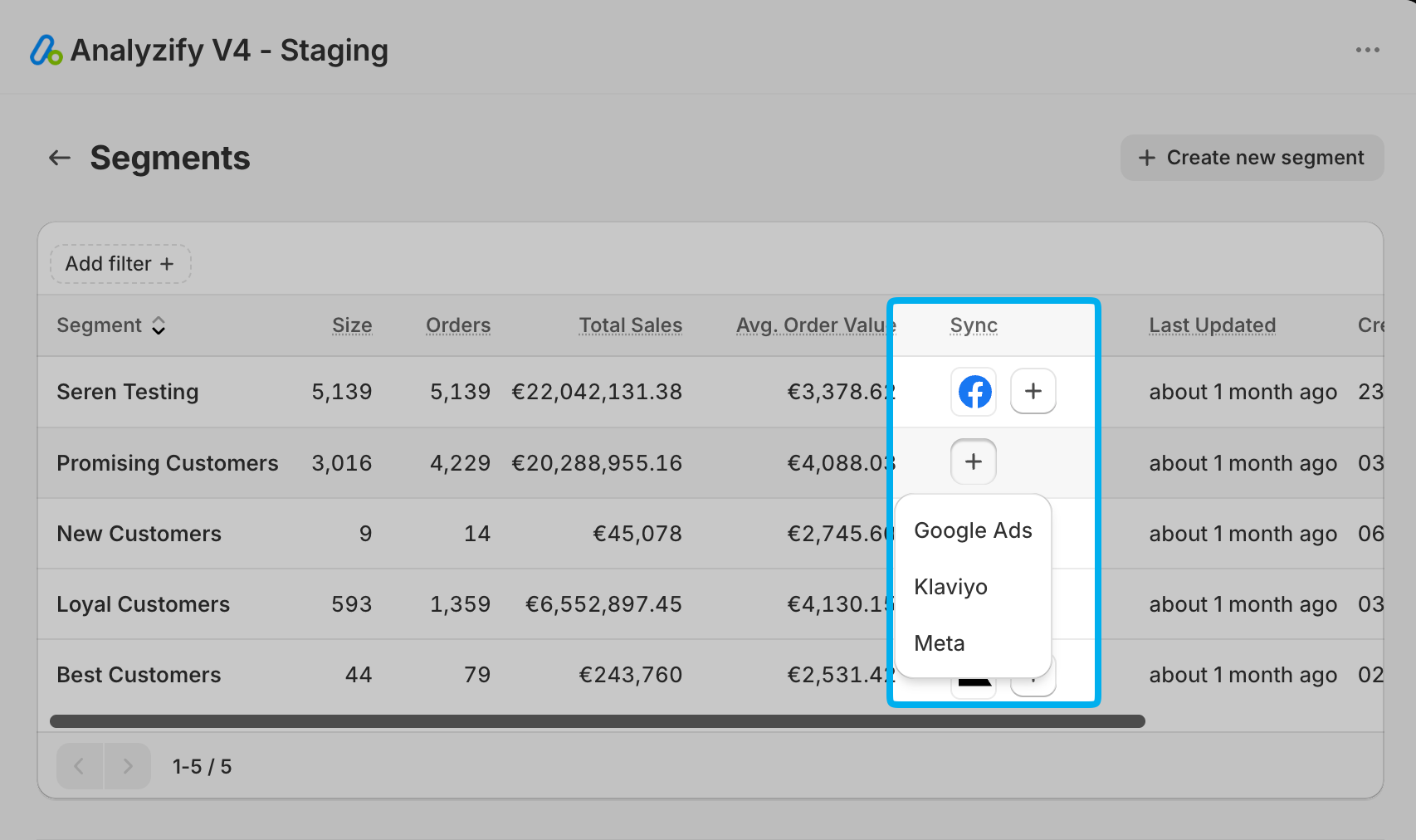
Step three is the one worth pausing on. If the preview returns only a handful of customers, the segment isn’t useful, and you simply don’t save it. You learn that before it becomes a dead audience sitting in an ad account.
Segments must be saved before they can be synced. Stopping a sync is equally direct: disconnect the integration.
Sync Behavior and Update Frequency
Segments update at two different speeds, and it helps to know which is which.
How Often do Segments Refresh?
Inside Analyzify, segment calculations update in real time as your Shopify data changes. A customer crosses a spend threshold, and the segment reflects it.
Inside advertising platforms, audience updates happen daily, because that’s the cadence platforms use to refresh matched customer lists. This is true of any tool syncing to Meta or Google, ours included.
Sync Status and Failure Visibility
Analyzify surfaces the state of every connection. You can see the last sync time, monitor connection status, and see failed sync attempts. Failures usually have plain causes. In Meta Ads, for instance, syncing fails if the ad account hasn’t accepted the Custom Audience Terms of Service.
Visibility into failure is worth more than it sounds. A silently broken audience is a campaign targeting a list that stopped updating weeks ago.
What the Platforms Show You Back
Once an audience arrives at its destination, platform behavior takes over, and every platform is more limited than the tool that fed it.
Do Advertising Platforms Show Segment Revenue?
Advertising platforms don’t display segment metrics. Revenue and order value don’t travel with the audience. Platforms show the audience name and the audience size, and nothing else.
In Google Ads you’ll find your audiences under Tools → Shared Library → Audience Manager, ready to use for campaign targeting, but performance has to be analyzed separately.
Customer Visibility Differs by Platform
In Klaviyo, individual customer profiles and names are viewable. In Google Ads and Meta Ads, individual identities are not. Those platforms expose aggregate audience size only, never the underlying users.
This is a platform limitation rather than anything to do with the integration, and no tool changes it.
It’s also the structural reason segment economics have to live where the segment is built. If you want to know what an audience is worth, you need that answer before the sync, because you will not find it after.
Where the Data Comes From and What Gets Sent
Shopify Data Read Directly
Segments in Analyzify rely entirely on Shopify data. Every core metric used in segment creation comes directly from Shopify, and reporting inside the app pulls from Shopify rather than from a separate analytics dataset held elsewhere.
The Identifiers Sent for Matching
Audience matching requires identifiers, so it’s reasonable to ask which ones leave your store.
Analyzify’s approach is to send the minimum personally identifiable information needed for accurate matching. For audience syncing, that means email and name. Phone numbers are not sent, because they aren’t required for match accuracy.
Can You Segment on Advertising Platform Data?
Segment conditions are limited to Shopify data, which has a practical consequence worth stating plainly: it isn’t currently possible to build segments from advertising platform data. A condition like “customers acquired through a specific Google Ads campaign” isn’t available today.
Side by Side Comparison
| Shopify native segments | Analyzify Segments | |
|---|---|---|
| Data source | Shopify data | Shopify data |
| Creation method | ShopifyQL query, templates, or Sidekick | 10 ready segments or rule-based conditions |
| Query language required | Underlying representation is ShopifyQL | None |
| Preview before saving | Yes | Yes |
| Group-by logic producing multiple segments | Not in this form | Yes |
| Segment report | Basic report per segment | Calculated layer: size, orders, sales, AOV |
| Aggregated segment totals | Not in the same form | Yes |
| CSV export | Yes | Yes |
| Sync to Klaviyo | Via Shopify’s integration | Direct |
| Sync to Meta Ads and Google Ads | Not available, needs Flow or manual upload | Direct |
| Multiple platforms at once | No | Yes |
| Automation layer needed | Shopify Flow or similar | None |
| In-app update frequency | n/a | Real time |
| Platform-side refresh | n/a | Daily |
| Sync status and failure visibility | n/a | Last sync time, connection status, failed attempts |
Conclusion
Shopify’s native segmentation is capable, free, and built into the admin. If your segments stay inside Shopify, or your marketing runs through Klaviyo alone, it covers the job.
The distance between the two tools opens up the moment a segment needs to do something. Analyzify answers what each segment is worth, moves it to Meta, Google Ads, and Klaviyo in one action, keeps it current, and shows you when a connection breaks, without a CSV export or an automation layer anywhere in the process.
Both tools describe your customers. One of them also puts them to work.